The real thing. Not a mockup.
Every screen below is the actual Warrivo desktop app. Click through to see how a messy client upload becomes a clean, approved folder.
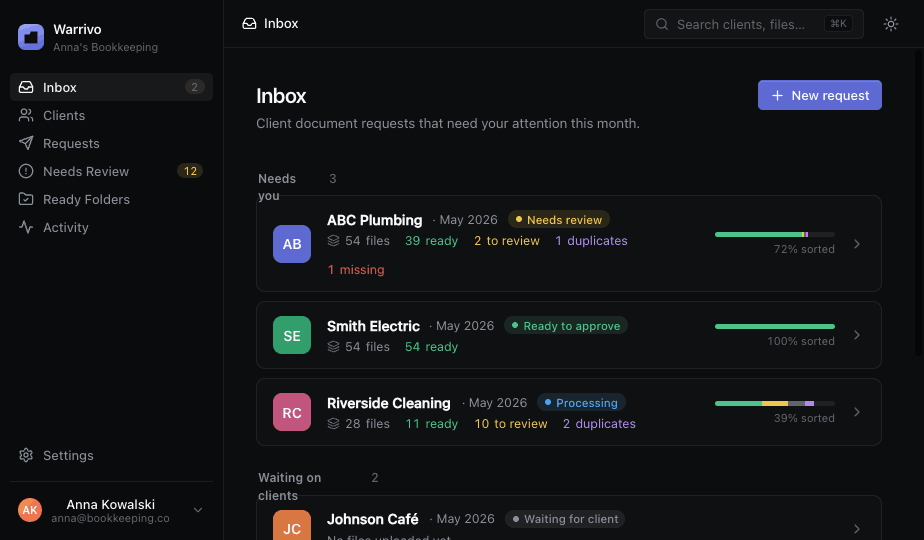
Your whole month, sorted by what needs you.
Open the app and every client's monthly request is right there — grouped into what needs you, what's waiting on clients, and what's done.
- ✓Live progress bar shows how much of each folder is already sorted
- ✓Ready · to-review · duplicate counts at a glance
- ✓The noisy ones float to the top so nothing slips
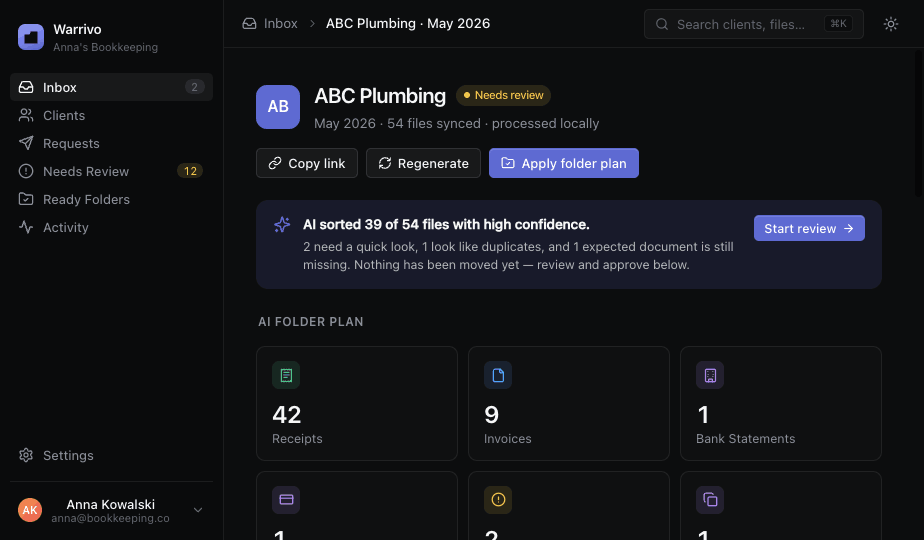
See the plan before a single file moves.
Warrivo reads all 54 uploads locally and proposes a clean folder structure — receipts, invoices, statements — with exact counts. Nothing is applied until you approve.
- ✓Every file already read, classified and labelled
- ✓Duplicates and missing documents flagged up front
- ✓One click applies the plan — Cmd+Z undoes the whole thing
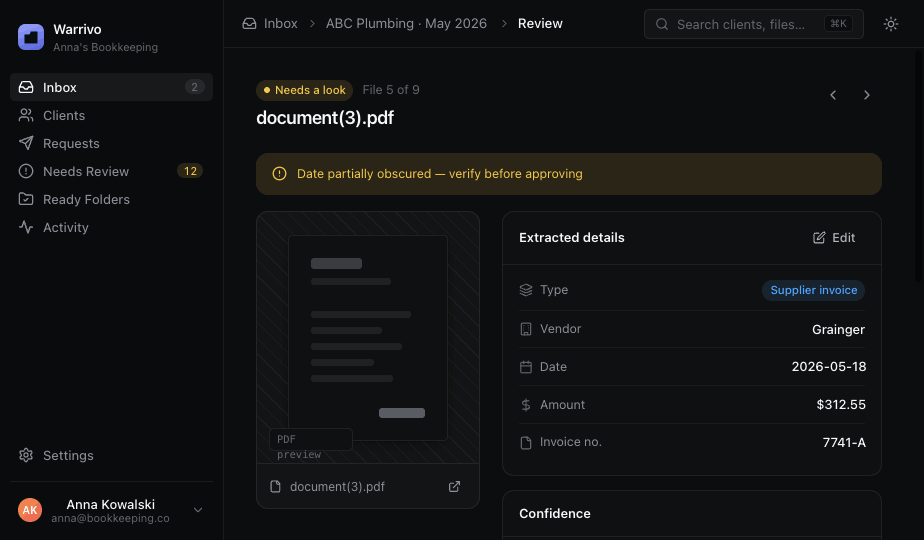
Check the AI's work, file by file.
For anything uncertain, you see exactly what was pulled out — vendor, date, amount, document type — alongside a confidence score and the raw OCR text it used as evidence.
- ✓Side-by-side document preview and extracted fields
- ✓Confidence ring shows OCR and model agreement
- ✓Corrections are remembered for that client forever
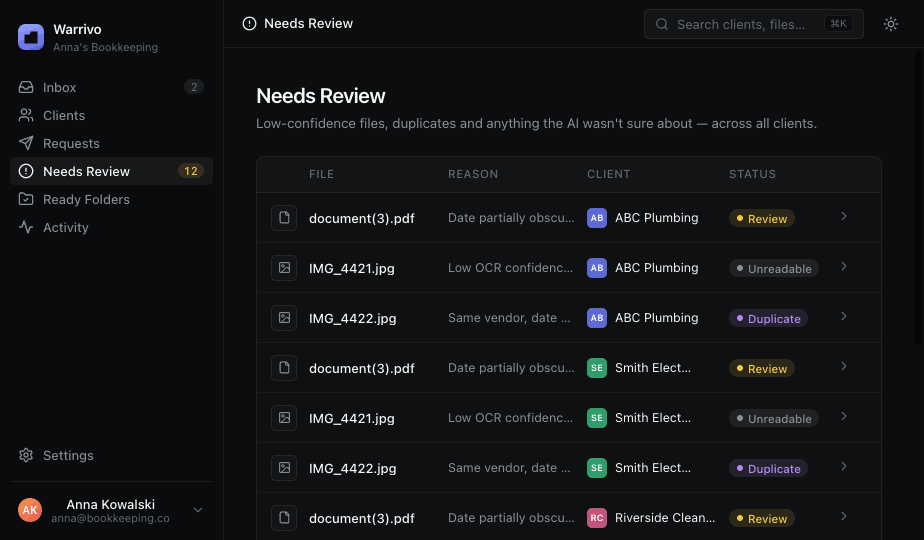
Only the tricky ones ever reach you.
Low-confidence scans, likely duplicates and unreadable photos are queued across every client. Bulk-approve the obvious; spend your attention only where it matters.
- ✓One queue spanning all clients and requests
- ✓Plain-English reason for every flag
- ✓Duplicates quarantined, never deleted
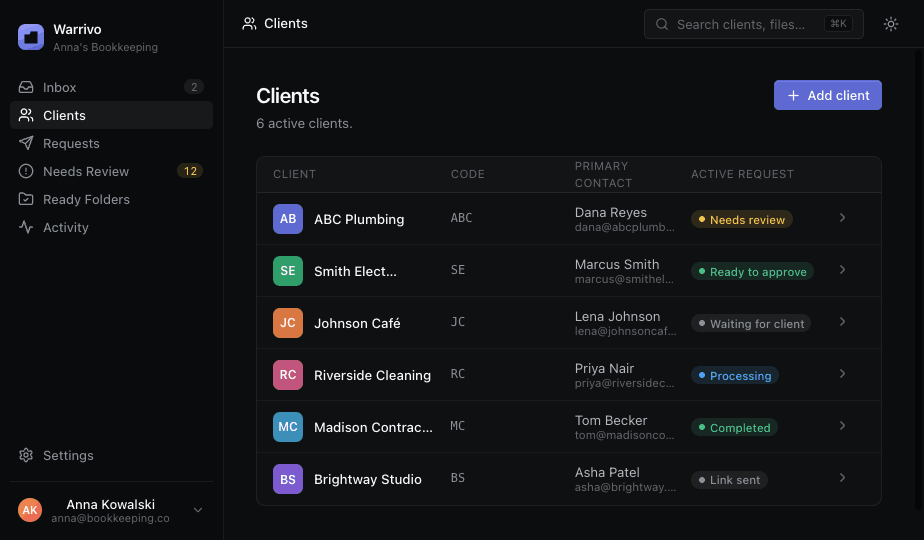
Every client, one quiet list.
Codes, primary contacts and the live status of this month's request — no heavy portal, no logins for your clients to forget.
- ✓This month's request status next to each client
- ✓No-login upload links your clients actually use
- ✓Search anything with ⌘K
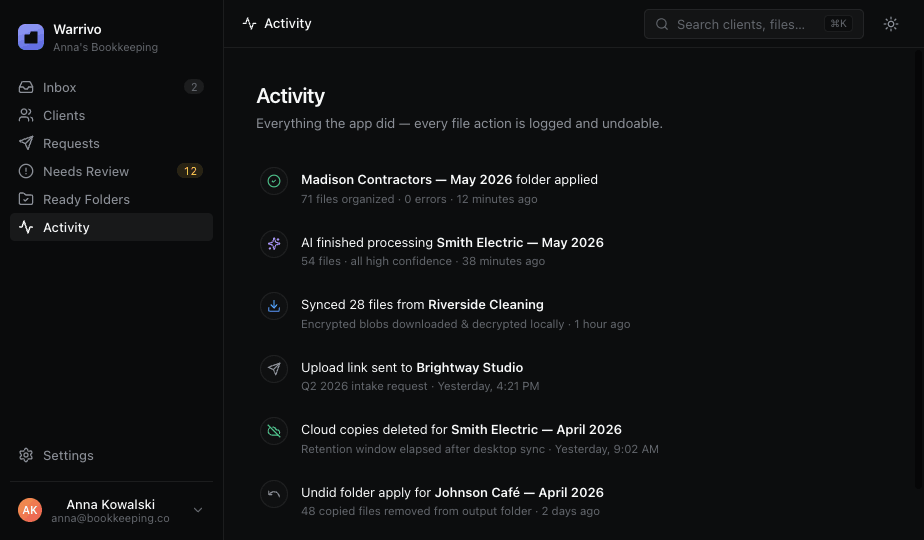
Every action logged. Every action reversible.
A full audit trail of applies, syncs, cloud deletions and undos — so you can always answer "what happened to that file?" months later.
- ✓Timestamped record of everything the app did
- ✓Cloud copies auto-deleted once your desktop has them
- ✓Undo any folder apply, even days later
Same chaos. Every single month.
Before the real bookkeeping starts, you're stuck doing the busywork no one bills for.
Names that mean nothing
IMG_3920.jpg, scan.pdf, document(3).pdf — you open each one just to learn what it is.
Junk & duplicates
Blurry photos, the same receipt twice, an invoice buried inside an email body.
Always something missing
The bank statement never came — so you chase, wait, and re-sort when it lands.
Four steps. You stay in control.
Every suggestion is reviewable. Originals are never deleted. One click undoes the whole thing.
Send a link
Create a monthly request. Your client opens a no-login upload page.
Client drops files
Photos or PDFs, encrypted in the browser before they ever leave.
AI sorts locally
Reads, renames, flags duplicates and spots what's missing — on your machine.
You approve
Review the plan, click Apply, and a clean folder appears.
Sorting by hand vs. Warrivo.
Same client folder, same files. Two very different Tuesdays.
The old way Hours lost
- ✕Open every file just to learn what it isOne window at a time, for 80+ files
- ✕Rename, retype dates, fix vendor spellingsBy hand, with a spreadsheet open on the side
- ✕Eyeball duplicates and blurry photosYou'll miss some. Everyone does.
- ✕Email the client back about missing statementsThen re-sort the whole pile when they reply
- ✕Hope you can remember what changed if anything breaksNo undo. No audit trail.
With Warrivo ~15 min/client
- ✓Files arrive already read and labelledVendor, date, total, doc type — pulled out for you
- ✓Bulk-approve the obvious onesTab through the rest in a clean review queue
- ✓Duplicates and blurry uploads flagged automaticallyQuarantined, never deleted
- ✓Missing-doc nudges sent to the client for youYour reminder. Your tone. One click.
- ✓Every move logged, every move reversibleCmd+Z works on the whole month
84 messy files. One clean folder. One click.
See exactly what will happen before anything moves. Approve the easy ones in bulk, review the rest.
Built with bookkeepers who hated month-end.
My slowest client used to take a full evening every month. Last close I finished her in 22 minutes — and that included tea.
The local AI thing matters. I can't ship client receipts off to some random cloud — my license literally forbids it.
I trust it because it shows me the plan before doing anything. And the undo actually undoes everything, not just the last step.
For everyone buried in client documents.
Solo bookkeepers
Juggling 10–50 small-business clients and a monthly receipt avalanche from each.
Small firms
Clean intake without rolling out a heavy client portal nobody actually wants to use.
Tax preparers
Documents named, dated and sorted before the season crunch hits.
Start free. Stay local.
Try it on one folder with no card. Upgrade when you're ready to run every client through it.
Kick the tires on a real client folder — no credit card required.
- ✓ 1 client
- ✓ 1 intake request
- ✓ 2 GB uploads
- ✓ Local AI sorting
- ✓ No credit card required
For solo bookkeepers who clean client folders every month.
- ✓ 1 seat
- ✓ 10 active clients
- ✓ 25 GB uploads/month
- ✓ 2,500 files/month
- ✓ No-login client upload links
- ✓ Local OCR + private local AI
- ✓ AI folder & filename suggestions
- ✓ Duplicates & missing docs
- ✓ Review before apply
- ✓ Cloud files deleted after desktop sync
Prices exclude VAT · Cancel anytime · Founding price locked for life while you stay subscribed
Common questions.
Where does the AI actually run?
Does it actually delete or move my files?
What if it gets a vendor or date wrong?
Does it work with QuickBooks / Xero / Dext?
Windows? Linux?
How is founding price locked for life actually structured?
Clean your first folder tonight.
Download Warrivo, point it at one messy client folder, and watch it sort — locally, on your machine. Free for 14 days, no card.
Free 14-day trial · No credit card · Apple silicon & Intel